





Power BI Dashboard Template for Email Marketing Performance
simple to use, smarter decision-making
- Fully customizable templates
- No monthly fees – one-time purchase
- Instant download after purchase
- Dedicated help and support included
- Lifetime access and future updates

Your email campaigns are going out.
But the real question is, are they earning their place in your strategy?
Every send carries more than content. It carries budget, effort, and expectation. Email performance isn’t just a marketing metric, it’s a reflection of how well your message is landing, converting, and driving growth. And yet, despite all the activity, clarity often remains elusive.
Launching campaigns is easy.
Understanding performance is not.
Most dashboards report volume.
Very few reveal movement.
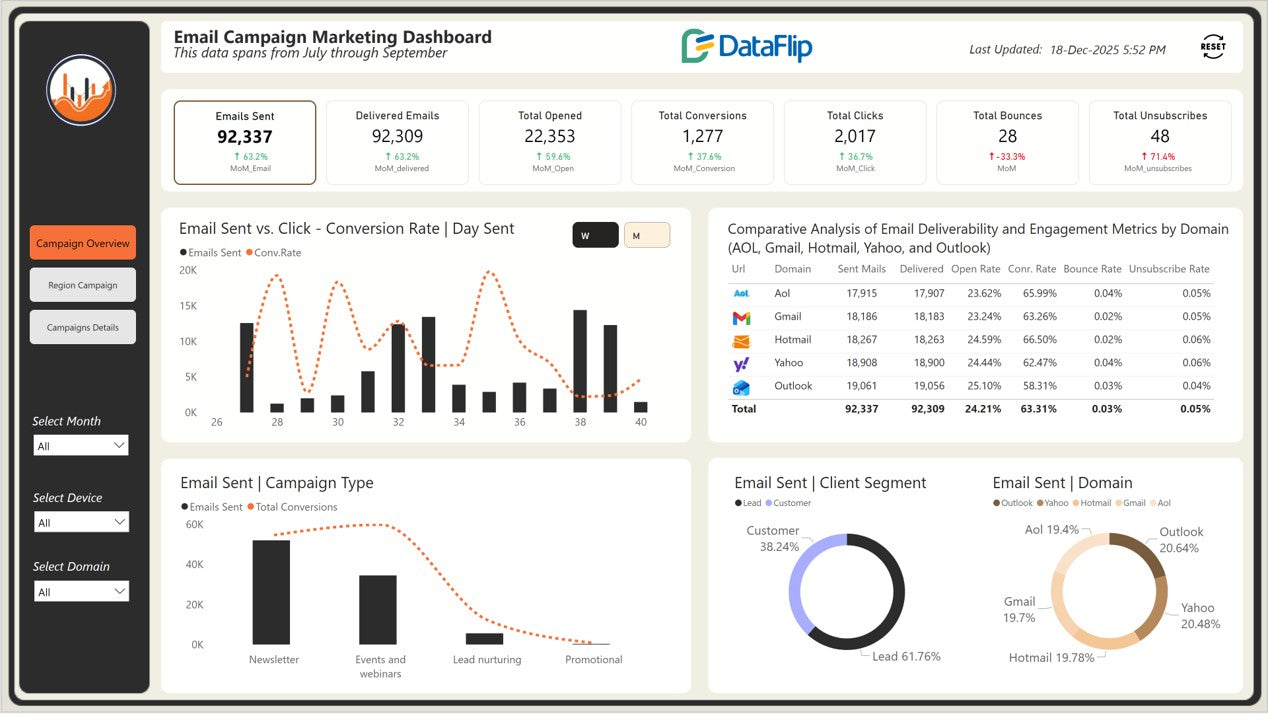
Built for modern marketing teams, this Power BI Email Marketing Dashboard turns campaign data into comparative intelligence across segments, regions, devices, and domains, so you don’t just see what happened, you understand why.
Because in high-stakes marketing, clarity isn’t a luxury.
It’s the difference between guessing and leading.
Explore an interactive Power BI marketing dashboard template that visualizes email performance across campaigns, regions, devices, domains, and customer segments, updated dynamically as you apply filters.
Key Benefits of This Power BI Email Marketing Dashboard
- See the full email funnel in one view, from Emails Sent to Opens, Clicks, and Conversions
- Identify winning and underperforming campaigns using conversion rate and click-to-conversion metrics
- Understand deliverability health with Delivered Emails, Bounce Rate, and Unsubscribe tracking
- Compare engagement across domains (Gmail, Outlook, Yahoo, AOL, Hotmail)
- Optimize campaigns by segment with Lead vs Customer performance insights
- Track regional performance trends to spot high-performing and low-engagement geographies
-
Monitor MoM performance changes across key KPIs for faster optimization cycles
Who Can Use This Template
- Email Marketing Managers
- Growth & Performance Marketing Teams
- CRM & Lifecycle Marketing Teams
- SaaS and B2B Marketing Analysts
- Digital Marketing Agencies
-
Leadership teams reviewing campaign ROI
How to Use This Template
- Open the .pbix file in Power BI Desktop
- Replace the sample dataset with your email marketing data
- Apply filters by month, region, device, domain, campaign, or segment
-
Instantly analyze engagement, conversions, and performance trends
Detailed Overview of Power BI Email Marketing Analytics
Business Impact of Power BI KPI Dashboard for Marketing
- Higher conversion efficiency by identifying campaigns with strong click-to-conversion performance
- Improved deliverability decisions through domain-wise bounce and open rate visibility
- Smarter audience targeting using lead vs customer engagement insights
- Reduced unsubscribe risk by spotting fatigue patterns early
- Faster campaign optimization cycles with month-over-month KPI comparisons
What’s Included
- Power BI Dashboard Template (.pbix)
- Sample Email Marketing Dataset
- User Guide PDF with step-by-step instructions to connect and change data sources from the sample dataset
-
PowerPoint Background Design to personalize colors, themes, and styles for brand identity
Technical Details
- File Format: .pbix (Power BI Desktop)
- Compatibility: Power BI Desktop (latest version recommended)
- Data Source: Replaceable sample dataset
-
Customization: Fully filter-driven and interactive