



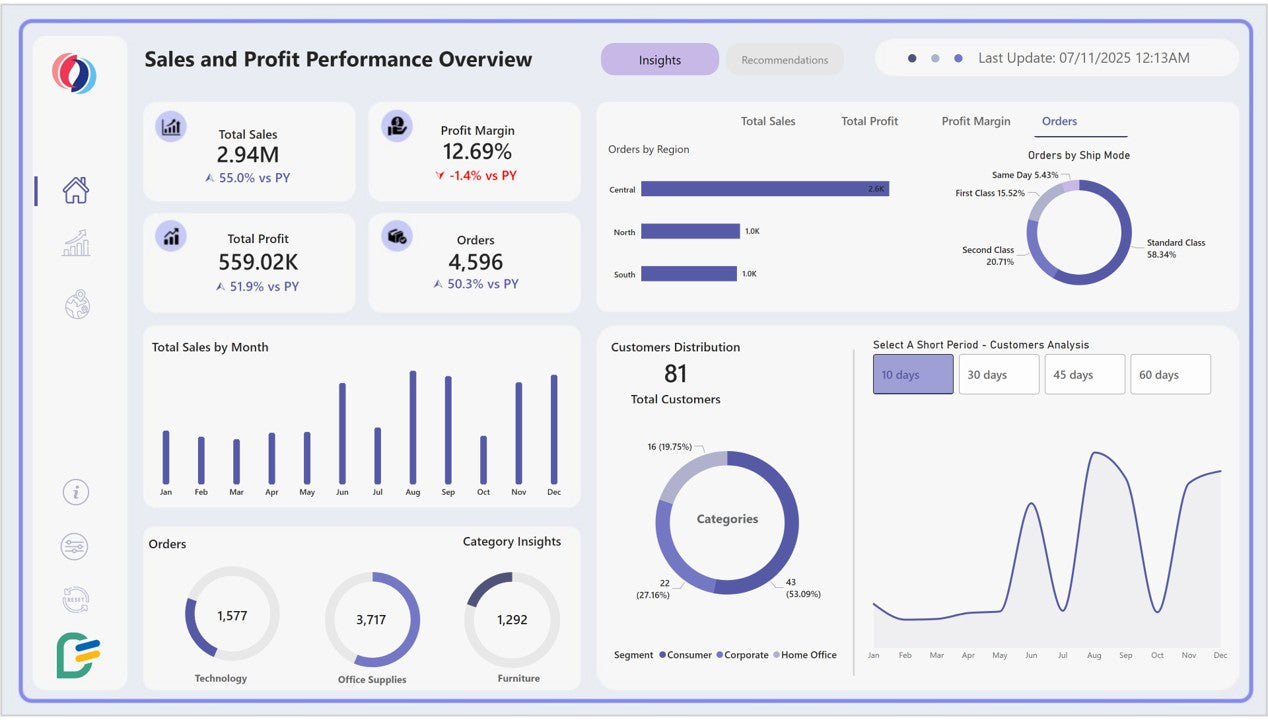


Sales & Profit Dashboard Template for Power BI
simple to use, smarter decision-making
- Fully customizable templates
- No monthly fees – one-time purchase
- Instant download after purchase
- Dedicated help and support included
- Lifetime access and future updates
Guaranteed Safe Checkout

As a business leader, you carry pressure every day, the pressure to hit targets, protect margins, guide teams, and grow consistently in a market that refuses to sit still. But how do you make confident decisions when your sales data feels scattered, slow, or incomplete?
Now imagine opening a dashboard that lifts that pressure instantly. A dashboard that shows exactly where sales are rising, why margins shift, which customers are growing, which ship modes drive returns, and how each region impacts your bottom line. No digging. No waiting. No uncertainty.
Just complete clarity, where your data finally speaks, and your business finally listens.
Explore interactive visuals across Sales Performance, Profit Trends, Customer Insights, Order Distribution, Delivery Efficiency, and Geographic Analysis.
Benefits of This Power BI Sales Dashboard Template
- Track core KPIs at a glance such as Total Sales, Total Profit, Profit Margin, Orders, and Customer Count.
- Understand category-wise performance
- Reveal shipment behaviors to identify best-performing ship modes by orders, delivery days, and profitability.
- Spot hidden profit drivers to compare YoY profit margin changes and category-level gains.
- Analyze customer segments with distribution, retention patterns, and short-period customer movement.
- Geographic insights for multi-country businesses to compare sales, profit, and order volume across regions.
- Identify return risks by tracking return rates, return insights, and correlations with shipping modes.
- See salesperson contribution by analyzing revenue, margin, and performance breakdown across the entire year.
- Make decisions faster with clean UI, navigation menu, smart filters, and actionable layout.
-
Ready for leadership reporting with clear visual storytelling built for presentations.
Who Can Use This Template?
Perfect for:
- Sales Managers & Team Leads
- Business Owners
- E-commerce Companies
- Retail Chains
- Supply Chain & Operations Teams
- BI Analysts
- Marketing & Revenue Teams
-
Consultants needing clean, ready-made dashboards
How to Use This Template
- Open the .pbix file in Power BI Desktop.
- Connect your data using the included User Guide PDF (with step-by-step instructions for changing sample data sources).
- Refresh your data and watch your visualizations come alive.
- Customize filters for region, category, year and month.
-
Editable PowerPoint Page Design Template included to apply your own background colors, themes, and brand identity.
Download now and turn your sales data into a growth engine.
Detailed Description of Sales Profit Reporting
This Power BI Sales Dashboard Template acts as a complete business intelligence system, merging sales performance analytics, profit tracking, and customer insights into one powerful reporting solution. With interactive views designed for clarity and action, this sales and profit dashboard helps you uncover crucial insights such as monthly revenue trends, category profitability, customer growth patterns, profit margin shifts, and YoY performance changes.
Use the sales KPI dashboard to analyze core metrics like Total Sales, Total Profit, Orders, Profit Margin, Total Customers, and Return Insights. Drill down by region, ship mode, product category, and time periods to see performance at every level. The profit analysis dashboard reveals product categories driving margins while highlighting areas with declining performance.
Geographic analysis visuals show how different countries perform across key metrics, helping multi-location businesses allocate resources, correct inefficiencies, and plan regional strategies. Return analytics, delivery insights, and correlation analysis between ship mode and return rate provide a deeper look into operational health.
Whether you're a fast-growing retailer or an established enterprise, this Power BI dashboard template simplifies complex reporting, shortens decision-making cycles, and gives leadership a clear view of business performance.
Business Impact of Business Intelligence Dashboard
Here’s the impact organizations typically see:
Stronger, Data-Backed Sales Strategy: With month-by-month sales trends, category insights, and segment-level ordering patterns, your team can forecast demand more accurately and double down on high-performing revenue streams.
Higher Profit Margins Across Channels: Profit margin visuals, YoY comparisons, and ship-mode-level cost insights help you pinpoint where profitability leaks occur, and where margin-boosting opportunities are hiding.
Reduced Return Rates and Better Order Quality: By analyzing return insights, ship mode correlations, and return rate trends, you can identify problematic delivery types, products, or regions and take corrective action before losses escalate.
Smarter Customer Targeting & Retention: Customer distribution, short-period analysis, and category preferences reveal which segments respond best, allowing you to personalize offers that improve loyalty and lifetime value.
Optimized Operations & Faster Fulfillment: With average delivery days, order breakdowns, and region-wise demand available at a glance, teams can optimize shipping methods, allocate inventory intelligently, and improve on-time delivery performance.
Informed Leadership & Confident Forecasting: Clear visuals around Total Sales, Total Profit, Orders, and Profit Margin equip leadership with trustworthy insights that support quarterly planning, team alignment, and long-term growth strategies.
Better Alignment Across Sales, Operations & Finance: Because the dashboard centralizes data from multiple functions, teams no longer work in isolation, everyone moves with the same real-time understanding of performance.
What’s Included
- Sales & Profit Dashboard Template (.pbix)
- Sample Dataset in excel format
- User Guide PDF with instructions to connect and replace sample data sources
-
Editable PowerPoint Background Design to apply your own background colors, themes, and brand identity
Fully interactive visuals
- Sales & Profit Overview
- Ship Mode Performance
- Geographic Performance
- Dynamic Insights & Recommendations
Technical Details
- File Format: .pbix
- Tool Required: Power BI Desktop (Free Version Supported)
- Compatibility: Windows Power BI Desktop
- Data Source: Replace sample data using the User Guide instructions
-
Customizable: Colors, visuals, filters, themes, layouts
Download the Sales & Profit Dashboard Template and unlock complete clarity across your sales cycle.
FAQ Section
1. Can beginners use this dashboard?
Yes. Even if you’re new to Power BI, the included User Guide PDF explains exactly how to connect and replace sample data sources. (Note: The guide does not cover advanced customizations.)
2. Can I customize colors and themes?
Absolutely. You can personalize the dashboard using Power BI’s formatting tools and use the PowerPoint Page Background Design to apply brand-aligned themes for presentations.
3. Does the template work with real business data?
Yes. The structure is designed to plug in your existing sales, customer, order, and product data seamlessly.
4. Is this dashboard editable?
Yes, every visual, measure, and page is fully editable so you can modify KPIs, add charts, or adapt layouts as needed.
5. Can I use this template for client projects?
Yes. You’re free to use it for internal teams, client consulting projects, or agency work.