





Retail Sales & Shipments Power BI Dashboard Template for Analytics & Performance
simple to use, smarter decision-making
- Fully customizable templates
- No monthly fees – one-time purchase
- Instant download after purchase
- Dedicated help and support included
- Lifetime access and future updates

Retail isn’t just about selling more, it’s about keeping more of what you earn.
But hidden costs, rising returns, and delivery inefficiencies quietly eat into your margins, and most reports don’t tell you where it’s happening.
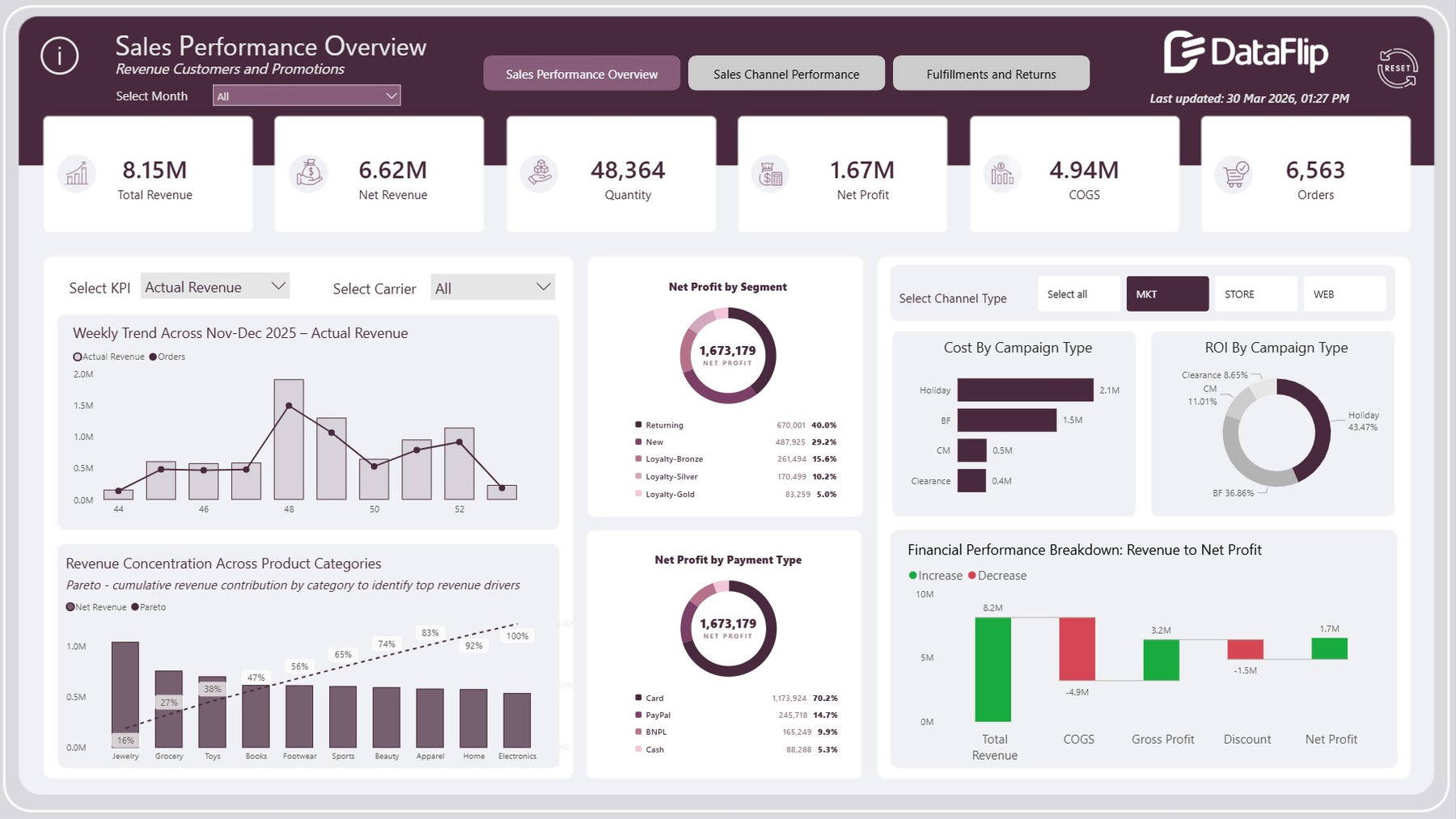
The Retail Sales & Shipments Power BI Dashboard Template gives you a complete retail analytics dashboard to track revenue, profit, product performance, shipments, and returns, all in one place.
Quickly see which products drive profit, which channels perform best, and where logistics is hurting your business, so you can take action faster and improve margins without guesswork.
Because in retail, the businesses that win aren’t just the ones that sell more, they’re the ones that understand their numbers better.
This dashboard turns high return rates into a strategic advantage by eliminating 20–32% profit leakage and fixing the root causes of customer dissatisfaction.
Benefits of this Shipments Tracking Dashboard
- Gain full visibility with a Retail analytics dashboard combining revenue, profit, and logistics
- Track total revenue, net revenue, net profit, COGS, orders, and quantity in one place
- Identify top-performing categories using Pareto-based product categories performance dashboard insights
- Improve margins with clear retail profitability analysis and cost breakdowns
- Monitor delivery efficiency, return rate, and shipment trends in real time
- Analyze returns and logistics tracking with reasons like wrong size, defective, and late delivery
- Compare carrier performance to optimize shipping cost and delivery timelines
- Evaluate ROI by campaign type to refine marketing spend
Who Can Use This Template
- Retail business owners and eCommerce brands
- Operations and supply chain managers
- Logistics and fulfillment teams managing deliveries and returns
- Finance teams tracking profitability and costs
- Marketing teams analyzing campaign ROI
How to Use This Template
- Load your retail sales and shipment dataset into Power BI file
- Map fields like revenue, orders, shipments, returns, and costs
- Use filters (month, channel, carrier, discount type) to explore insights
- Analyze sales, channel performance, and delivery efficiency across pages
- Use insights and recommendations to take action
Detailed Description of Retail Analytics Dashboard & Sales Performance Power BI Template
- Track total revenue, net revenue, net profit, COGS, and orders to understand true business performance
- Monitor weekly revenue trends and order patterns to identify growth spikes and demand drops
- Use Pareto analysis to identify top revenue-driving product categories contributing up to 80%+ of revenue
- Analyze net profit by customer segments (Returning, New, Loyalty tiers) to optimize retention strategies
- Evaluate payment-wise profit distribution (Card, PayPal, BNPL, Cash) to understand transaction profitability
- Break down revenue to net profit journey including COGS and discount impact for clear margin visibility
- Compare sales across channels (MKT, Store, Web) with detailed KPI-level breakdown (orders, quantity, revenue, profit margin)
- Identify top-performing product categories such as Jewellery, Grocery, Toys, and Footwear to focus inventory and marketing
- Analyze campaign cost and ROI by type (Holiday, BF, CM, Clearance) to optimize promotional spend
- Track shipments, shipment cost, avg delivery days, and returns to monitor logistics performance
- Measure delivery efficiency and return rate to identify operational gaps
- Analyze return reasons (wrong size, changed mind, defective, late delivery) to reduce return volume
- Compare carrier performance (FedEx, UPS, DHL) across delivery efficiency, return rate, cost, and refunds
- Use actionable insights to detect issues like below-target delivery efficiency or high return rate and act quickly
Business Impact of Revenue and Profit Dashboard
- Improve profit margins by controlling COGS and discount impact
- Reduce return rates through actionable root-cause insights
- Optimize delivery performance and carrier selection
- Focus on high-performing products and channels for revenue growth
- Make faster, data-driven operational and financial decisions
What’s Included
- Fully functional Power BI Dashboard (.pbix file)
- Sample retail dataset in excel.
- User Guide PDF with step-by-step instructions to connect and change data sources from the sample dataset
- PowerPoint Background Design to apply background colors and themes for brand identity
Technical Details
- File Format: .pbix (Power BI Desktop)
- Tool Required: Microsoft Power BI Desktop
- Data Sources: Excel / CSV / Google sheet Database compatible
- Customization: Fully editable visuals, measures, and filters
- Visualize insights using a mix of native and HTML-based custom visuals for enhanced storytelling