



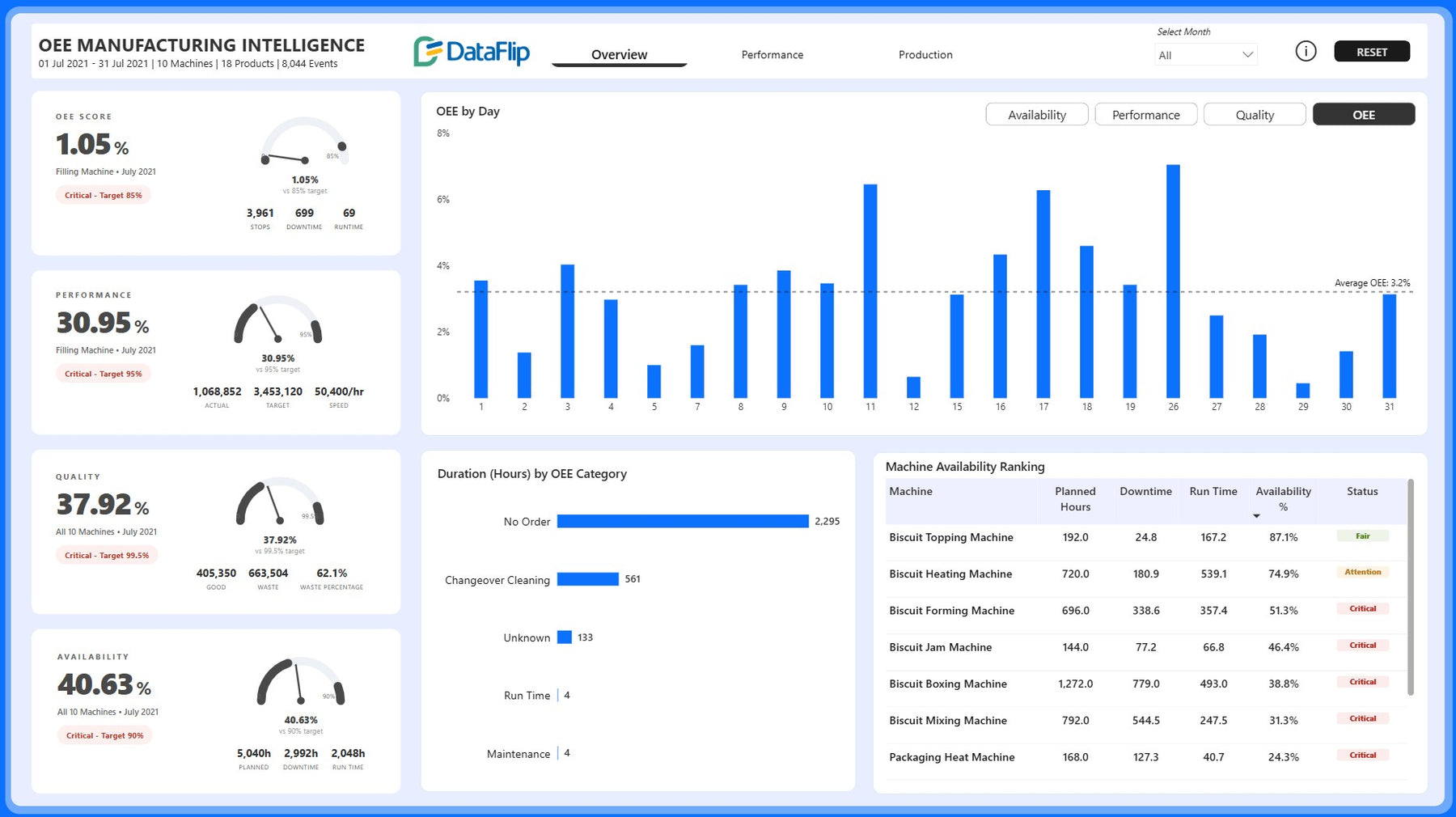


OEE Manufacturing Performance Dashboard in Power BI
simple to use, smarter decision-making
- Fully customizable templates
- No monthly fees – one-time purchase
- Instant download after purchase
- Dedicated help and support included
- Lifetime access and future updates
Guaranteed Safe Checkout

What if you could see exactly where production time, machine capacity, and profitability are being lost, before those losses impact your bottom line?
The OEE Manufacturing Performance Dashboard in Power BI is built for manufacturers who want more than reports, they want results. By bringing together OEE, Availability, Performance, Quality, Downtime Analysis, MTBF, Machine Performance Monitoring, Production Output Tracking, Waste Analysis, and Equipment Reliability into a single intelligence platform, this dashboard helps uncover the hidden causes of operational inefficiency that traditional reports often miss.
Instead of reacting to downtime after production targets are missed, you can proactively identify failing equipment, recurring stoppages, excessive waste, and declining machine performance as they happen. From machine level availability rankings to product level waste analysis and production output trends, every visual is designed to help teams make faster, smarter, and more profitable decisions.
The result? Higher equipment utilization, lower downtime, reduced waste, improved production quality, stronger operational control, and a measurable increase in Overall Equipment Effectiveness. For organizations committed to operational excellence, this dashboard becomes more than a reporting tool, it becomes a competitive advantage.
Improve OEE and reduce downtime by up to 80% with a comprehensive OEE analytics solution designed for modern manufacturing operations.
Monitor Availability, Performance, Quality, OEE, downtime hours, machine stoppages, MTBF, runtime, waste generation, and production output across machines, production lines, and products.
Benefits of this OEE Manufacturing Performance Dashboard
- Monitor all three pillars of Overall Equipment Effectiveness (OEE), Availability, Performance, and Quality, from a single dashboard.
- Identify downtime drivers through detailed Downtime Analysis and stoppage tracking.
- Track machine level availability rankings to quickly identify underperforming assets.
- Measure runtime, planned hours, downtime hours, and equipment utilization across production lines.
- Analyze major versus minor stoppages and their impact on production performance.
- Monitor MTBF Analysis (Mean Time Between Failures) to evaluate equipment reliability.
- Track daily OEE trends and compare actual performance against targets.
- Evaluate machine-specific stoppage durations to prioritize maintenance actions.
- Monitor production output such as good biscuits, waste, packs produced, and cases produced.
- Identify products generating the highest waste percentages through detailed Waste Analysis.
- Compare actual output versus good output to understand quality losses.
- Improve manufacturing efficiency by uncovering bottlenecks affecting production throughput.
- Support lean manufacturing and continuous improvement initiatives with data-driven insights.
- Reduce production losses caused by equipment downtime, quality issues, and performance inefficiencies.
- Enable faster operational decision making through interactive drill-down analysis.
Who Can Use This Dashboard
- Manufacturing & Factory Operations Teams to track production efficiency, equipment utilization, machine performance, and OEE metrics across manufacturing facilities.
- Plant Managers to monitor downtime, machine availability, production output, and operational performance from a single view.
- Production Supervisors to Identify production bottlenecks, stoppage causes, and quality issues affecting output targets.
- Maintenance Teams to analyze machine reliability, downtime duration, and MTBF trends to support preventive maintenance planning.
- Continuous Improvement Teams to measure operational performance and identify opportunities to improve manufacturing efficiency and reduce waste.
- Manufacturing Analysts to build actionable production intelligence using interactive manufacturing KPIs and performance analytics.
How to Use This OEE Manufacturing Performance Dashboard
- Open the dashboard in Microsoft Power BI Desktop (.PBIX file)
- Use the included Excel sample dataset to instantly explore the dashboard, and later replace it with your manufacturing production dataset to reflect your business insights
- To connect your own data, update the data source path (PDF guide included)
- Refresh the dataset to automatically update all KPIs and visuals
- Map machine, production line, downtime, stoppage, and quality data fields.
- Use insights to prioritize maintenance actions, improve production planning, and reduce operational losses.
Ready to improve manufacturing productivity?
Transform raw production data into actionable operational intelligence with the OEE Manufacturing Performance Dashboard in Power BI and start optimizing equipment performance today.
Detailed Description of OEE Manufacturing Performance, Overall Equipment Effectiveness & Manufacturing KPI Dashboard
Manufacturing success depends on maximizing machine availability, maintaining production quality, and minimizing performance losses. This OEE Manufacturing Performance Dashboard provides a comprehensive view of Overall Equipment Effectiveness, helping organizations monitor the key drivers behind manufacturing productivity.
- The Overview page consolidates critical manufacturing KPIs including OEE Score, Availability %, Performance %, Quality %, Planned Hours, Downtime Hours, Runtime Hours, Stops, Good Output, Waste Output, and Machine Availability Rankings
- Daily OEE trends help production teams understand performance fluctuations while machine rankings highlight assets requiring immediate attention.
- Downtime is often one of the biggest hidden costs in manufacturing. The Performance page provides deep Downtime Analysis through Total stoppages, Major vs minor stoppages, Daily stoppage trends, Downtime hours by category, Downtime duration by machine, Product line stoppage analysis, MTBF Analysis, and Runtime versus downtime performance
- These insights help maintenance and operations teams quickly identify the equipment and processes causing the greatest productivity losses.
- Production output alone does not guarantee operational success. Quality losses and waste can significantly impact profitability. The Production page enables detailed Production Performance Analytics by tracking Actual Output vs Good Output, Good Biscuits vs Waste Biscuits, Packs Produced, Cases Produced, Quality Rate, Waste Percentage, Product-Level Waste Analysis, and Product Output Quality Comparison
- Teams can quickly identify products generating excessive waste and focus improvement efforts where the greatest gains can be achieved.
- Unlike static reports, this Power BI Manufacturing Dashboard converts operational data into decision-ready insights. By combining OEE monitoring, downtime analysis, production output tracking, waste analysis, and equipment reliability metrics, organizations gain a complete picture of factory performance and operational effectiveness.
Business Impact of Production Line Performance
- Reduce unplanned downtime by identifying recurring stoppages, machine failures, and downtime drivers before they significantly impact production output.
- Improve overall equipment effectiveness by monitoring Availability, Performance, and Quality metrics together to drive measurable OEE improvements.
- Increase manufacturing throughput by optimizing machine utilization and production scheduling to maximize runtime and output.
- Strengthen equipment reliability by using MTBF and machine performance data to support proactive maintenance decisions.
- Reduce waste & quality losses by pinpointing products and processes generating excessive waste and focus improvement efforts where they deliver the highest returns.
- Accelerate continuous improvement programs by providing operational teams with a single source of truth for identifying bottlenecks and performance improvement opportunities.
- Improve production visibility by replacing disconnected spreadsheets and manual reports with a centralized manufacturing intelligence platform.
- Drive data-backed operational decisions to enable production, maintenance, and plant leadership teams to make faster, more confident decisions using performance insights.
What's Included
- Fully Interactive OEE Manufacturing Performance Dashboard (.pbix)
- Sample Dataset in Excel format
- User Guide PDF with step-by-step instructions for connecting sample dataset
- PowerPoint Background Design to apply background colors and themes for brand identity
Technical Details
File Format : .pbix
Platform : Microsoft Power BI Desktop
Compatibility : Power BI Desktop and Power BI Service
Customization : Fully customizable visuals, KPIs, calculations, and branding
Data Sources : Can be connected to Excel, CSV, Googlesheet data sources
User Guide Included : Detailed PDF guide with instructions to connect data sources using sample dataset
Visuals : Combination of native Power BI visuals and selected HTML powered visuals for enhanced reporting experience
Start Improving Manufacturing Performance Today
Equip your operations team with the visibility needed to reduce downtime, improve OEE, increase throughput, and strengthen manufacturing efficiency using this ready-to-deploy Power BI dashboard.
Frequently Asked Questions (FAQ)
Is this dashboard suitable for any manufacturing industry?
Yes. The dashboard can be adapted for food manufacturing, automotive, industrial equipment, consumer goods, packaging, pharmaceuticals, and other manufacturing environments.
Can I connect my own production data?
Yes. The dashboard includes instructions for connecting the sample dataset and allows to replace it with your own manufacturing data sources.
Does the dashboard calculate OEE automatically?
Yes. OEE metrics are automatically calculated and visualized once the required production and machine data is connected.
Can I customize the KPIs and visuals?
Absolutely. The dashboard is fully editable and can be customized to match your manufacturing processes and reporting requirements.
Does this dashboard support machine-level analysis?
Yes. Users can analyze availability, downtime, runtime, stoppages, and reliability metrics at the machine level.
Is a user guide included?
Yes. A detailed PDF guide is included with instructions for connecting and changing data sources from the sample dataset.
Do I need Power BI Pro to use this dashboard?
No. You can use and modify the dashboard in Power BI Desktop. Power BI Pro is only required for certain sharing and collaboration features in the Power BI Service.